
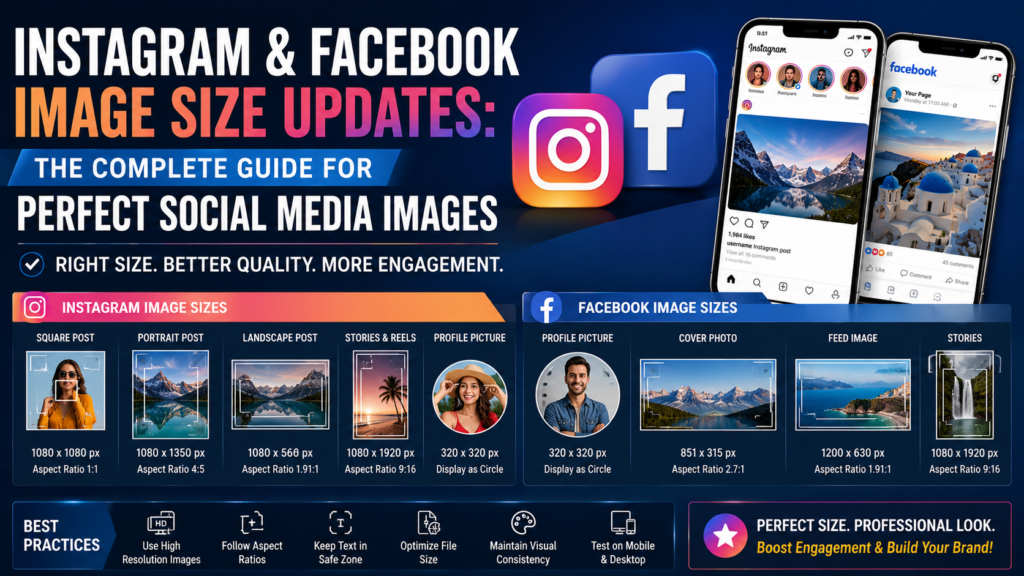
Instagram and Facebook Image Size Updates: The Complete Guide for Perfect Social Media Images
Introduction
Social media platforms continue to evolve, and with every update, image specifications, display formats, and content recommendations change. For businesses, photographers, designers, influencers, marketers, and content creators, keeping up with the latest Instagram and Facebook image size updates is essential. Using the correct image dimensions ensures that photos appear sharp, professional, and visually appealing across all devices.
Poorly sized images can become blurry, cropped incorrectly, or compressed, reducing engagement and weakening your brand’s visual identity. Whether you’re posting product photos, marketing graphics, event promotions, travel photography, or personal content, understanding the latest image size recommendations helps maximize visibility and user engagement.
This comprehensive guide explains the latest Instagram and Facebook image size updates, best practices for image optimization, common mistakes to avoid, and professional tips for creating high-quality social media visuals.
Why Image Size Matters
Image dimensions directly affect how your content appears on social media.
Using the correct size provides several advantages:
- Better image quality
- Faster page loading
- Higher engagement
- Professional appearance
- Improved user experience
- Reduced unwanted cropping
- Better visibility in feeds
- Stronger brand consistency
Optimized images also perform better across smartphones, tablets, laptops, and desktop computers.
Latest Instagram Image Sizes
Instagram supports multiple content formats, each with recommended image dimensions.
Square Posts
Square images remain one of Instagram’s most popular formats.
Recommended size:
1080 × 1080 pixels
Aspect Ratio:
1:1
Square posts work well for:
- Product photography
- Portraits
- Food photography
- Quotes
- Brand graphics
Portrait Posts
Portrait images occupy more screen space, increasing visibility while users scroll through their feeds.
Recommended size:
1080 × 1350 pixels
Aspect Ratio:
4:5
Portrait posts often generate higher engagement because they take up more vertical space.
Landscape Posts
Landscape images are ideal for:
- Travel photography
- Architecture
- Group photos
- Wide product displays
Recommended size:
1080 × 566 pixels
Aspect Ratio:
1.91:1
Instagram Story Size
Stories remain one of Instagram’s most effective engagement tools.
Recommended dimensions:
1080 × 1920 pixels
Aspect Ratio:
9:16
Stories support:
- Photos
- Videos
- Polls
- Links
- Stickers
- Product promotions
Keeping important text away from the top and bottom edges prevents interface elements from covering your content.
Instagram Reels Cover Image
A high-quality cover image improves the appearance of your profile.
Recommended dimensions:
1080 × 1920 pixels
When designing the cover, ensure important content remains centered since profile grids display a cropped version.
Instagram Profile Picture
Recommended size:
320 × 320 pixels
Although displayed as a circle, uploading a square image ensures better quality.
Keep logos and faces centered.
Latest Facebook Image Sizes
Facebook supports several image formats depending on content type.
Facebook Profile Picture
Recommended size:
320 × 320 pixels
Images display as circles but should be uploaded as squares.
Facebook Cover Photo
Recommended size:
851 × 315 pixels
For better quality on modern devices, many designers create larger versions while maintaining the same aspect ratio.
Cover photos should include:
- Branding
- Business information
- Promotional visuals
- Minimal text
Facebook Feed Images
Recommended size:
1200 × 630 pixels
This size performs well across desktop and mobile devices.
Facebook Stories
Recommended dimensions:
1080 × 1920 pixels
Aspect Ratio:
9:16
Stories allow businesses to promote products, events, offers, and behind-the-scenes content.
Why High-Resolution Images Matter
Uploading high-quality images reduces visible compression.
Professional images create:
- Better first impressions
- Increased trust
- Stronger branding
- Higher engagement
- Better click-through rates
Photographers and businesses should always export images using high-quality settings while keeping file sizes optimized.
Understanding Social Media Compression
Instagram and Facebook automatically compress uploaded images.
Compression helps platforms reduce storage requirements and improve loading speed.
However, excessive compression can reduce image quality.
To minimize quality loss:
- Export images in JPEG format for photographs.
- Use PNG for graphics with text.
- Avoid excessive sharpening.
- Maintain recommended dimensions.
- Keep file sizes optimized.
Best Practices for Instagram Images
Professional creators follow several best practices.
These include:
- Shoot in high resolution.
- Edit photographs before uploading.
- Use consistent color grading.
- Maintain visual branding.
- Avoid excessive filters.
- Keep compositions clean.
- Leave margins for interface elements.
Consistency helps build a recognizable brand identity.
Best Practices for Facebook Images
Facebook users consume content quickly.
Images should:
- Capture attention immediately.
- Include simple messaging.
- Use readable typography.
- Avoid cluttered layouts.
- Focus on one primary subject.
- Maintain high contrast.
Well-designed visuals generally receive more shares and engagement.
Common Image Size Mistakes
Many creators accidentally reduce image quality by making simple mistakes.
Common errors include:
- Uploading low-resolution files.
- Ignoring recommended aspect ratios.
- Stretching images.
- Cropping important subjects.
- Using excessive text.
- Compressing files multiple times.
- Forgetting mobile optimization.
Avoiding these mistakes improves professionalism and user experience.
How Businesses Benefit from Optimized Images
Businesses rely heavily on visual content.
Properly optimized images help:
- Increase sales
- Improve engagement
- Build customer trust
- Strengthen brand recognition
- Improve advertising performance
- Support marketing campaigns
Professional image editing further enhances visual consistency across social media channels.
Tips for Professional Social Media Photography
To produce outstanding social media content:
- Use natural lighting whenever possible.
- Maintain consistent editing styles.
- Capture multiple compositions.
- Keep backgrounds clean.
- Use professional photo editing.
- Export images at recommended dimensions.
- Test images before publishing.
- Organize files for future campaigns.
Future Trends in Social Media Images
Social media platforms continue evolving.
Future trends include:
- AI-assisted image optimization
- Smarter automatic cropping
- HDR image support
- Interactive visual content
- Better mobile displays
- Personalized content recommendations
- Improved image compression
Creators who stay updated with these changes will maintain stronger online visibility.
Frequently Asked Questions
Why do Instagram images appear blurry?
Blurry images usually result from uploading files that are too small, heavily compressed, or incorrectly resized.
Which image format is best?
JPEG is generally recommended for photographs, while PNG works well for graphics containing text.
Can I upload larger images?
Yes, but Instagram and Facebook automatically resize oversized images.
Why do my images get cropped?
Incorrect aspect ratios often cause automatic cropping.
Should businesses hire professional editors?
Yes. Professional editing improves consistency, enhances quality, and creates a stronger brand image.
Conclusion
Using the correct Instagram and Facebook image sizes is one of the simplest ways to improve your social media presence. Proper dimensions help images display clearly, reduce unwanted cropping, and create a more professional appearance across all devices.
As social media platforms continue updating their algorithms and display formats, photographers, businesses, marketers, and creators should regularly review recommended image sizes and optimize their visual content accordingly.
Combining the correct image dimensions with high-quality photography, thoughtful design, and professional editing creates stronger engagement, better branding, and improved marketing performance.
Need Professional Photo Editing Services?
Creating outstanding social media content requires more than simply taking great photographs. Professional editing ensures your images look polished, consistent, and ready for Instagram, Facebook, eCommerce stores, advertising campaigns, and business websites.
Photo Editing Services Company. offers expert image editing solutions for photographers, online retailers, digital marketers, agencies, and businesses worldwide.
Their professional services include:
- Clipping Path Services
- Background Removal
- Image Masking
- High-End Photo Retouching
- Product Photo Editing
- Ghost Mannequin Effects
- Jewelry Photo Retouching
- Real Estate Photo Enhancement
- Color Correction
- Bulk Image Editing
Learn more about their professional editing services by visiting:
https://www.photoeditingservicesco.com/
With experienced editors, quick turnaround times, and exceptional quality, Photo Editing Services Co. helps businesses and photographers create stunning visuals that stand out across every digital platform.
