
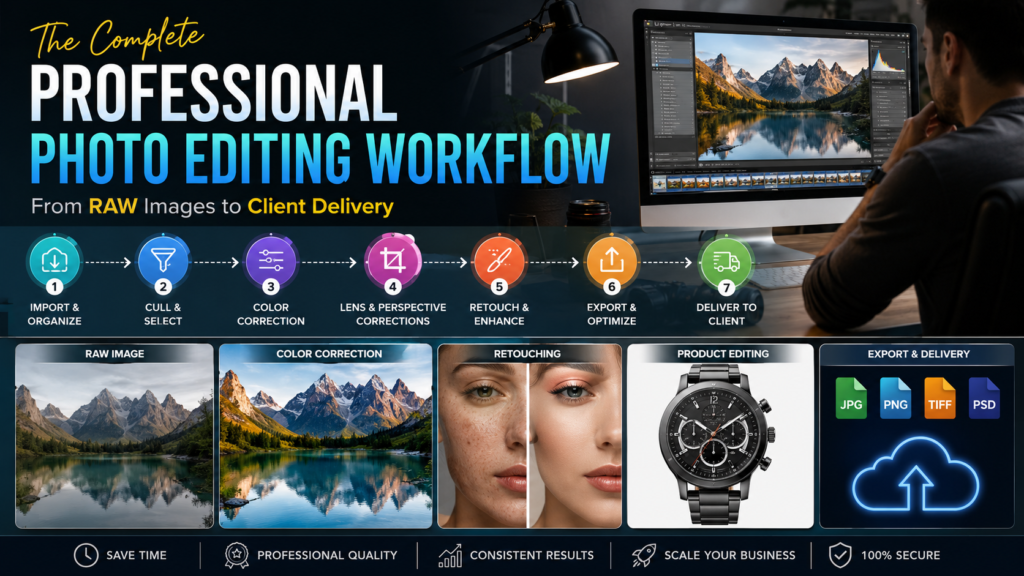
The Complete Professional Photo Editing Workflow: From RAW Images to Client Delivery
Every great photograph tells a story—but the camera rarely captures the final masterpiece. Whether you’re a wedding photographer delivering 2,000 images, an eCommerce brand managing thousands of product photos, or a real estate agency competing for buyers, professional post-processing is what transforms good images into business assets.
Modern businesses rely on consistent, high-quality visuals because customers make decisions within seconds of seeing an image. Well-edited photos improve trust, strengthen branding, and help businesses present products and services more professionally. Professional editing also allows photographers to spend less time behind a computer and more time shooting.
At Photo Editing Services Company, we’ve spent over a decade helping photographers, eCommerce businesses, real estate professionals, agencies, and global brands streamline their editing process with specialized retouching services. The company offers services ranging from clipping paths and product retouching to virtual staging, panorama stitching, and high-end portrait editing.
This guide explains the complete workflow professionals use—from importing RAW files to delivering polished images.

Why a Professional Photo Editing Workflow Matters
Many photographers think editing is simply adjusting brightness or applying presets. In reality, a structured workflow saves hours while maintaining consistency across hundreds—or even thousands—of images.
A professional workflow helps you:
- Maintain consistent colors across an entire shoot
- Deliver images faster
- Reduce repetitive editing
- Preserve maximum image quality
- Meet client expectations
- Scale your photography business
For businesses, consistent imagery directly supports stronger branding and better customer confidence.
The 7 Stages of Professional Photo Editing
Stage 1: Import and Organize RAW Files

Professional editing begins with organization.
Instead of importing files randomly, create a folder structure like:
- Client Name
- Event Date
- RAW Files
- Edited Files
- Exports
- Backup
During import:
- Rename files systematically.
- Apply copyright metadata.
- Add keywords.
- Create backups immediately.
A proper naming system prevents confusion when managing large projects.
Stage 2: Image Culling

The biggest time saver isn’t faster editing—it’s smarter selection.
Professional photographers typically:
- Remove blurry images
- Delete duplicates
- Reject closed-eye portraits
- Keep the strongest compositions
Using star ratings or color labels helps organize selections efficiently.
Stage 3: Global Color Correction

Before detailed retouching, editors correct the entire image.
Common adjustments include:
|
Adjustment |
Purpose |
|---|---|
|
Exposure |
Brightness balance |
|
White Balance |
Accurate colors |
|
Contrast |
Improve depth |
|
Highlights |
Recover bright areas |
|
Shadows |
Reveal details |
|
Blacks & Whites |
Strong tonal range |
The goal is creating a clean foundation before advanced edits.
Stage 4: Lens Corrections
Many photographers overlook this step.
Professional editors automatically correct:
- Lens distortion
- Chromatic aberration
- Vignetting
- Perspective issues
These corrections are especially important for:
- Real estate photography
- Architecture
- Product photography
Stage 5: Detailed Retouching
This is where professional expertise becomes visible.


Portrait Retouching
Professional portrait editing includes:
- Skin cleanup
- Blemish removal
- Teeth whitening
- Eye enhancement
- Hair cleanup
- Natural skin texture preservation
The objective isn’t making someone look fake—it’s making them look their best naturally.
Product Photo Retouching
For eCommerce businesses, every product image represents the brand.
Professional product editing typically includes:
- Dust removal
- Reflection control
- Color accuracy
- Shadow creation
- Background replacement
- Consistent alignment
This is particularly valuable for marketplaces like Amazon, Shopify, Flipkart, and eBay, where clean, professional product images help strengthen trust.
Real Estate Editing
Property images often require specialized editing.
Professional editors improve:
- HDR balance
- Window exposure
- Sky replacement
- Lawn enhancement
- Object removal
- Vertical alignment
These enhancements create attractive listings while maintaining a realistic appearance.
Stage 6: Quality Control
Before exporting, professionals inspect every image.
Checklist:
- Zoom to 100%
- Check skin texture
- Remove editing artifacts
- Verify color consistency
- Ensure straight horizons
- Confirm background cleanliness
Quality control is often what separates premium editing companies from low-cost providers.
Stage 7: Export for Different Uses
Different platforms require different export settings.
|
Platform |
Recommended Format |
|---|---|
|
Website |
|
|
|
TIFF |
|
Social Media |
JPEG |
|
eCommerce |
JPEG |
|
Magazine |
TIFF |
Proper exporting maintains quality while optimizing file size.
The Difference Between Amateur and Professional Editing
|
Amateur |
Professional |
|---|---|
|
Over-saturated colors |
Natural tones |
|
Heavy skin smoothing |
Texture preserved |
|
Inconsistent exposure |
Balanced lighting |
|
Uneven backgrounds |
Clean edges |
|
Random workflow |
Structured process |
Clients notice consistency—even when they can’t identify the technical reason.
Industry-Specific Editing Workflows
Wedding Photography


Wedding photographers often process thousands of images.
Workflow:
- Import
- Cull
- Batch color correction
- Portrait retouching
- Album preparation
- Client delivery
Many professionals outsource this stage to maintain faster turnaround times.
photoeditingservicesco.com
eCommerce Workflow


Online stores require consistent product presentation.
Typical workflow:
- Background removal
- Shadow creation
- Color matching
- Size consistency
- Web optimization
Professional product editing helps businesses present catalogs with a unified appearance.
Real Estate Workflow


Property images require speed and consistency.
Workflow:
- HDR merging
- Window correction
- Sky replacement
- Virtual staging
- Final sharpening
High-quality property photos create stronger first impressions for buyers.
Professional Image Retouching
Advanced Editing Techniques Professionals Use
Frequency Separation
Used for:
- Skin retouching
- Beauty photography
- Fashion work
This separates texture from color for cleaner edits.
Dodge and Burn
Professional editors shape light manually instead of relying on filters.
Benefits:
- Natural depth
- Better facial contours
- Professional beauty results
Color Grading


Color grading creates emotional consistency.
Popular styles:
- Cinematic
- Warm lifestyle
- Luxury fashion
- Bright commercial
- Moody editorial
Consistency matters more than dramatic effects.
Common Editing Mistakes That Hurt Businesses
Avoid these errors:
- Oversaturated colors
- Plastic-looking skin
- Crooked product alignment
- Inconsistent white backgrounds
- Excessive sharpening
- Poor color matching
These mistakes reduce trust and make brands appear less professional.
When Should You Outsource Photo Editing?
Outsourcing becomes valuable when:
- Editing consumes more time than shooting.
- You need consistent results.
- You handle large image volumes.
- Clients expect fast delivery.
- Your business is growing.
A professional editing partner can help photographers focus on creative work while maintaining high-quality output. Companies like Photo Editing Services Company also offer free trial edits for new clients to demonstrate quality before larger projects.
Professional Image Retouching
Choosing the Right Photo Editing Partner
Before outsourcing, evaluate:
Experience
Look for companies with years of professional experience and diverse industry expertise.
Professional Image Retouching+1
Services
A complete editing partner should offer:
- Clipping Path
- Image Masking
- Product Retouching
- Portrait Editing
- Real Estate Editing
- Virtual Staging
- Panorama Stitching
- Photo Restoration
Turnaround Time
Reliable companies clearly communicate delivery schedules, including options for faster turnaround when needed.
Professional Image Retouching
Quality Control
Every image should undergo professional review before delivery.
Future Trends in Professional Photo Editing
The industry continues evolving with:
- AI-assisted editing
- Faster batch processing
- Smarter masking
- Automated object detection
- Hybrid AI plus human retouching
While AI speeds repetitive tasks, experienced human editors remain essential for brand consistency, complex retouching, and high-end commercial work.
Frequently Asked Questions
How long does professional photo editing take?
Standard projects are often completed within 12–48 hours, depending on image volume and complexity.
Professional Image Retouching
Can you edit RAW files?
Yes. Professional editors commonly work with RAW, TIFF, PSD, JPEG, and PNG files.
Professional Image Retouching
Is outsourcing safe?
Reputable companies use secure workflows and deliver edited files according to client specifications.
What industries benefit most?
- Wedding photography
- Real estate
- eCommerce
- Fashion
- Advertising
- Portrait photography
- Product catalogs
Final Thoughts
Professional photo editing is no longer just about making images look better—it’s about creating visual assets that support business growth. A structured workflow ensures consistency, improves efficiency, and helps photographers and brands deliver premium-quality images at scale.
Whether you’re processing hundreds of wedding photos, optimizing thousands of eCommerce products, or enhancing real estate listings, investing in a professional workflow—or partnering with an experienced editing company—can save valuable time while maintaining the quality clients expect.
