
Best AI Photo Editing Tools Compared in 2026
Artificial Intelligence has transformed post-processing from pixel manipulation into an intuitive, prompt-driven workflow. In 2026, AI photo editors handle tedious masking, object removal, high-ISO noise reduction, and generative element insertion in seconds.
Whether you are a professional photographer managing batch portrait edits, an e-commerce brand optimizing product photos, or a marketer creating visual assets, choosing the right tool depends on your precision requirements and volume.
Top AI Photo Editing Software Comparison
| Tool | Core Strength | Key AI Features | Pricing | Best For |
|---|---|---|---|---|
| Adobe Photoshop (Firefly) | Professional compositing & generative editing | Generative Fill, Generative Expand, Neural Filters, Precise Auto-Masking | $22.99/mo | Creative professionals, retouchers, designers |
| Skylum Luminar Neo | Creative landscape & portrait enhancement | Sky AI, Relight AI, Atmosphere AI, Portrait Background Removal | $11.95/mo or $299 Lifetime | Landscape, travel, and portrait photographers |
| Topaz Photo AI | Image recovery & enhancement | Sharpen AI, Gigapixel Upscaling, DeNoise AI, Face Recovery | $199 one-time | Wildlife, macro, sports, and archival image restoration |
| Canva AI (Magic Studio) | Quick visual design & social marketing | Magic Edit, Magic Eraser, Background Remover, Text-to-Image | $14.99/mo (Pro) | Social media managers, marketers, small business owners |
| Capture One AI | High-volume batch editing & color tethering | AI Masking (Subject/Background), Speed Edit, Smart Transfer | $29/mo or $299 Perpetual | Studio, commercial, and fashion photographers |
Detailed Analysis of the Best AI Photo Editors
1. Adobe Photoshop (Powered by Adobe Firefly)
Adobe remains the industry benchmark by combining deep layer-based precision with generative AI powered by Adobe Firefly 3.
- Key AI Capabilities:
- Generative Fill & Expand: Seamlessly add, remove, or extend canvas boundaries using natural language prompts while retaining perspective, lighting, and shadow integrity.
- Neural Filters: Alter facial expressions, age, colorize black-and-white photos, and transfer artistic styles non-destructively.
- One-Click Object & Subject Selection: Automatically isolates complex hair strands, transparent objects, and detailed backgrounds.
- Pros: Unmatched pixel control, non-destructive editing workflow, commercially safe generative outputs.
- Cons: Subscription-only pricing model; steep learning curve for complete beginners.
2. Skylum Luminar Neo
Luminar Neo focuses on heavy-lifting landscape and portrait adjustments using scene-aware AI algorithms that operate without requiring complex manual masks.
- Key AI Capabilities:
- Sky AI & Relight AI: Replaces dull skies and adjusts scene illumination in 3D space, ensuring foreground objects receive correct light bounces.
- Portrait Enhancer AI: Automatic skin smoothing, eye whitening, iris reflection adjustment, and slim lighting controls.
- Generative Swap & Erase: Cleanly removes power lines, sensor dust spots, and unwanted background clutter.
- Pros: Highly intuitive user interface; modular tool stack; available as a standalone app or plugin for Lightroom/Photoshop.
- Cons: Resource-heavy on mid-tier hardware during complex generative renders.
3. Topaz Photo AI
Topaz Photo AI acts as a surgical detail recovery suite. It automatically detects blur, noise, and low-resolution pixels to deliver pristine clarity.
- Key AI Capabilities:
- Autopilot Analysis: Scans images upon import to determine exact noise reduction, sharpening strength, and resolution scaling requirements.
- Gigapixel AI Upscaling: Increases resolution up to 600% without loss of sharpness or artifact creation.
- Face Recovery: Reconstructs soft or out-of-focus faces in low-light or legacy digital photographs.
- Pros: Industry-leading noise reduction and detail recovery; available with perpetual licensing.
- Cons: Focused on correction rather than creative manipulation or compositional design.
4. Canva Magic Studio
Canva integrates accessible AI media tools directly into a web-based design ecosystem, making fast image adjustments accessible to non-designers.
- Key AI Capabilities:
- Magic Eraser & Edit: Brush over any element to erase it or swap it with a newly generated object via text prompts.
- Instant Background Removal: Isolated backgrounds in one click for product mockups and social graphics.
- Pros: Fast web interface; includes thousands of templates, stock assets, and export options.
- Cons: Lacks deep layer controls, RAW image processing, and color grading depth.
When Automated AI Tools Fall Short
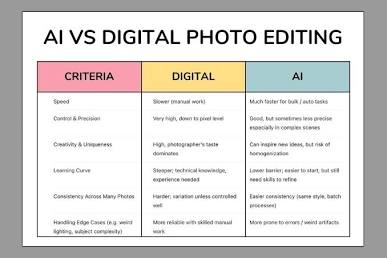
While AI editors accelerate repetitive tasks, automated algorithms can stumble on high-stakes projects—such as complex e-commerce catalog retouching, shadow reconstruction, fine jewellery processing, or large-scale real estate exposure blending.
For high-volume commercial projects requiring pixel-perfect consistency and human oversight, pairing software tools with dedicated professional post-production specialists yields the highest quality results. To explore professional retouchers for high-volume or complex editing, visit Photo Editing Services Co.
