
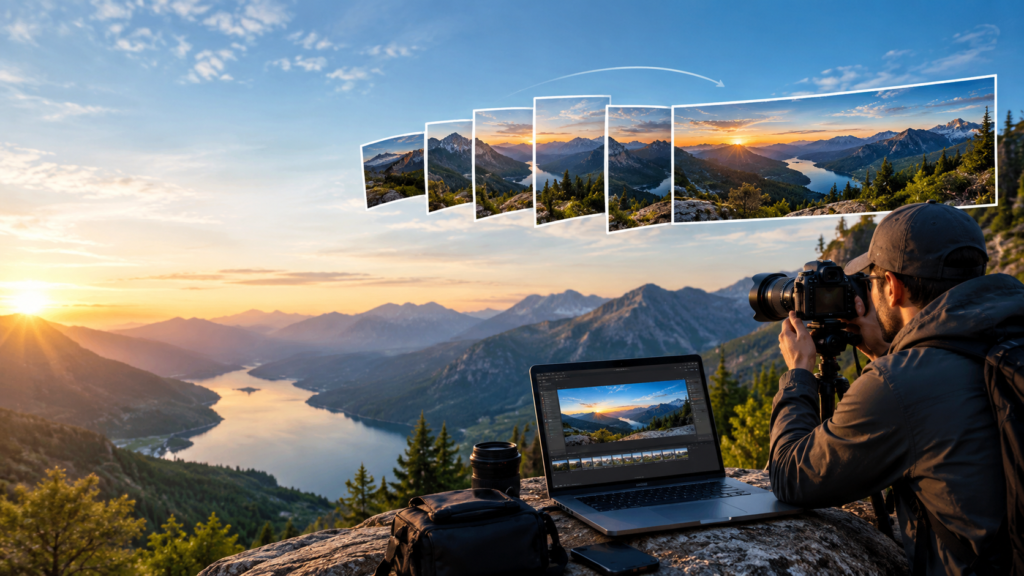
Panorama 360 Photo Stitching: The Complete Guide to Creating Seamless, High-Resolution Wide-Angle Images
In today’s visual-first digital world, ordinary photographs are no longer enough to capture the full beauty of a space, landscape, or property. Whether you’re showcasing a luxury hotel, marketing a real estate listing, documenting architectural projects, or creating immersive travel content, viewers expect a complete experience rather than a single static image.
That’s where Panorama 360 Photo Stitching becomes a game-changing solution.
Instead of relying on one wide-angle photograph, panorama stitching combines multiple overlapping images into a single, seamless panoramic masterpiece. The result is a high-resolution image that preserves incredible detail while offering viewers a natural and immersive perspective.
In this comprehensive guide, you’ll learn how panorama stitching works, why professional editing makes a difference, common challenges photographers face, and how expertly stitched panoramas can dramatically improve your marketing, presentations, and virtual experiences.
What Is Panorama 360 Photo Stitching?
Panorama 360 Photo Stitching is the professional editing process of merging multiple overlapping photographs into one continuous panoramic image. Rather than stretching a single image—which often causes distortion—editors carefully align individual photographs, match colors, correct perspective, and blend every frame into a flawless final composition.
The finished image creates the illusion that it was captured in one perfectly wide shot.
Professional panorama stitching is widely used for:
- Real estate photography
- Hotel and resort marketing
- Architectural documentation
- Interior design portfolios
- Landscape photography
- Travel promotions
- Event photography
- Virtual tours
- Commercial showrooms
- Drone aerial panoramas
Modern panoramic images can also be converted into interactive 360-degree experiences that allow viewers to explore every direction naturally. Professional editors often combine manual alignment, HDR blending, exposure correction, and geometric adjustments to create seamless panoramas optimized for websites, VR platforms, and marketing materials.
Why Panoramic Images Capture More Attention
A single photograph shows only one angle.
A panoramic image tells the complete story.
When people browse property listings, hotel websites, or travel destinations, they want to understand the entire environment before making a decision. Wide panoramic images create a stronger emotional connection because they replicate how our eyes naturally observe a space.
Businesses increasingly use panoramic photography because it helps:
- Increase customer engagement.
- Showcase larger spaces naturally.
- Improve website appearance.
- Create immersive virtual experiences.
- Build trust through transparent presentations.
- Generate more inquiries and bookings.
Research across real estate, hospitality, and virtual-tour industries consistently shows that immersive visual content keeps visitors engaged longer and helps communicate space more effectively than standard photographs.
How Professional Panorama Stitching Actually Works
Creating a seamless panorama involves much more than pressing a “merge” button.
Professional editors follow a structured workflow that combines technical precision with artistic judgment.
Step 1: Capturing Overlapping Images
Everything begins during the photography session.
Instead of taking one extremely wide photo, photographers capture multiple images while rotating the camera gradually.
Each frame typically overlaps the previous one by approximately 25% to 40%.
This overlap provides enough matching details for accurate stitching later.
Step 2: Intelligent Image Alignment
Editing software identifies thousands of matching points across every photograph.
These include:
- Corners
- Patterns
- Textures
- Architectural lines
- Natural features
Professional editors manually refine alignment whenever automatic detection struggles.
Step 3: Perspective Correction
Wide-angle photography often introduces distortion.
Common issues include:
- Leaning buildings
- Curved walls
- Slanted ceilings
- Uneven horizons
Editors carefully straighten vertical and horizontal lines to create a realistic appearance.
Step 4: Exposure and Color Matching
Even small lighting changes can create noticeable differences between photos.
Professional editing balances:
- Brightness
- White balance
- Shadows
- Highlights
- Contrast
- Color temperature
The entire panorama becomes visually consistent from edge to edge.
Step 5: Seamless Blending
Visible stitching lines immediately reduce image quality.
Professional editors blend every transition naturally so textures, colors, and lighting flow smoothly across the entire panorama.
Step 6: Final Quality Enhancement
Before delivery, editors optimize:
- Sharpness
- Noise reduction
- High-resolution output
- Cropping
- Print readiness
- Web optimization
The result is a polished panoramic image suitable for both digital and print use.
Types of Panorama Stitching Techniques
Different projects require different panorama styles.
Horizontal Panorama Stitching
This is the most common format.
Perfect for:
- Landscapes
- Beaches
- Mountains
- City skylines
- Sports stadiums
Vertical Panorama Stitching
Used when photographing tall subjects.
Ideal for:
- Skyscrapers
- Waterfalls
- Churches
- Towers
- Monuments
Cylindrical Panorama
Cylindrical panoramas wrap images naturally around a curved viewing plane.
They’re popular for:
- Interior photography
- Museums
- Hotel lobbies
- Restaurants
Spherical 360 Panorama
The most immersive option.
Viewers can explore:
- Left
- Right
- Up
- Down
These panoramas power virtual tours and VR experiences. Professional workflows commonly support cylindrical, spherical, and HDR panorama outputs for real estate, hospitality, and interactive viewing platforms.
Advanced Editing Techniques That Create Perfect Panoramas
Automatic stitching software is useful, but complex scenes require professional editing techniques.
Manual Control Point Adjustment
Repeated patterns like windows, tiles, or brick walls often confuse automatic software.
Editors manually reposition alignment points to achieve pixel-perfect accuracy.
Multi-Band Blending
Instead of blending entire images uniformly, multi-band blending combines different frequency layers separately.
Benefits include:
- Smoother transitions
- Better texture preservation
- Invisible seams
- Natural lighting continuity
Lens Distortion Correction
Every camera lens introduces slight optical distortion.
Professional editors correct:
- Barrel distortion
- Pincushion distortion
- Edge stretching
This produces cleaner architectural lines.
HDR Panorama Blending
High Dynamic Range stitching combines multiple exposure levels.
This preserves details in:
- Bright windows
- Dark interiors
- Sunset skies
- Reflective surfaces
The final panorama appears balanced without looking artificial. HDR blending and exposure balancing are especially valuable for interiors with bright windows and high-contrast scenes.
Ghost Removal
Moving people, vehicles, or trees can create duplicated objects.
Professional editors remove these distractions while maintaining a natural appearance.
Common Panorama Stitching Problems and Their Solutions
Even experienced photographers encounter stitching challenges.
Misaligned Frames
Small camera movements can shift image positions.
Professional alignment eliminates these errors.
Visible Stitch Lines
Poor blending leaves obvious seams.
Manual blending creates smooth transitions.
Uneven Exposure
Changing sunlight creates inconsistent brightness.
Color balancing restores uniformity.
Perspective Distortion
Buildings appear tilted.
Perspective correction straightens architectural lines.
Ghosting Artifacts
Moving subjects appear multiple times.
Advanced ghost removal solves this issue.
These corrections transform imperfect source images into professional-quality panoramic visuals.
Best Camera Settings for Panorama Photography
Great editing starts with great photography.
For the best stitching results, photographers should use consistent camera settings throughout the sequence.
Recommended Settings
- Manual exposure
- Manual focus
- Fixed white balance
- Low ISO
- Tripod stabilization
- Consistent overlap between images
These practices reduce editing time while improving final quality.
Industries That Benefit Most from Panorama 360 Photo Stitching
Real Estate Photography
Property buyers want to understand room layouts before scheduling visits.
Panoramic interiors help showcase:
- Spacious living rooms
- Luxury kitchens
- Open floor plans
- Outdoor spaces
Professional panorama stitching has become a valuable tool for real estate marketing because it creates immersive property presentations and improves online engagement.
Hotels and Resorts
Hotels use panoramic images to showcase:
- Guest rooms
- Swimming pools
- Restaurants
- Conference halls
- Reception areas
Immersive visuals encourage more confident bookings.
Architecture
Architects require accurate visual documentation.
Panoramic images preserve:
- Building proportions
- Interior flow
- Structural details
without excessive distortion.
Interior Design
Designers present complete room transformations through seamless panoramic photography.
Clients better understand:
- Furniture placement
- Lighting
- Color harmony
- Spatial balance
Travel and Tourism
Tourism businesses use panoramic landscapes to inspire travelers before they arrive.
Wide scenic views create stronger emotional connections.
Retail and Commercial Spaces
Showrooms, malls, and retail stores benefit from panoramic photography because customers can explore entire spaces before visiting.
Drone Panorama Stitching: A New Perspective
Drone photography has expanded the possibilities of panorama creation.
Instead of photographing from ground level, aerial panoramas capture:
- Resorts
- Construction sites
- Farms
- Industrial facilities
- Coastal landscapes
- Residential communities
Drone panorama editing requires additional corrections, including horizon leveling, exposure normalization, and distortion adjustment.
When edited professionally, aerial panoramas become powerful marketing assets. Professional aerial panorama workflows often include horizon correction, exposure normalization, and seamless stitching for high-resolution drone imagery.
Why Manual Editing Still Beats Automatic Software
Many smartphones now include panorama modes.
While convenient, automatic tools have clear limitations.
Professional editing delivers:
- Cleaner alignment
- Higher resolution
- Better perspective correction
- Natural color consistency
- Ghost-free images
- Print-quality output
- Virtual tour compatibility
Experienced editors combine advanced software with manual adjustments to ensure every panoramic image looks realistic rather than artificially processed.
How Professional Panorama Editing Improves Business Marketing
High-quality panoramic images do much more than look attractive.
They directly support business growth by improving visual communication.
Stronger First Impressions
Visitors immediately notice immersive visuals.
Longer Website Engagement
Interactive panoramic content encourages users to spend more time exploring.
Higher Customer Confidence
Clear, realistic images help reduce uncertainty before purchasing or booking.
Better Social Media Performance
Wide panoramic images naturally attract attention while encouraging more shares and engagement.
Premium Brand Perception
Professionally edited visuals communicate quality, professionalism, and attention to detail.
For businesses competing online, panoramic photography has become an investment rather than an optional upgrade.
Choosing the Right Panorama Photo Stitching Service
Not every editing service delivers the same level of quality.
When selecting a panorama stitching partner, look for:
- Manual stitching refinement
- HDR blending capability
- Perspective correction
- Ghost removal expertise
- High-resolution delivery
- Fast turnaround
- Multiple output formats
- Secure file handling
Professional editors should also understand industry-specific requirements for real estate, hospitality, architecture, and virtual tour platforms.
Why Professional Panorama Stitching Is Worth the Investment
Creating a flawless panoramic image requires technical expertise, creative judgment, and meticulous attention to detail. While automated tools can produce basic results, they often struggle with complex interiors, changing lighting conditions, repetitive patterns, and moving subjects.
Professional panorama editing eliminates these limitations by ensuring every frame aligns perfectly, every color transition looks natural, and every detail remains sharp. The result is a polished, high-resolution image that enhances marketing materials, strengthens brand credibility, and creates a more engaging experience for your audience.
Whether you’re a photographer delivering premium work to clients, a real estate agency showcasing luxury properties, a hotel promoting immersive room tours, or an architect presenting completed projects, professionally stitched panoramas help your visuals stand out in an increasingly competitive digital landscape.
Professional 360 Panorama Photo Stitching Services
If you’re looking for pixel-perfect 360 panorama photo stitching, our team is ready to transform your raw images into seamless, high-resolution panoramic masterpieces.
We specialize in manually refined panorama editing that goes beyond automatic software, delivering natural-looking results with invisible stitching lines, balanced lighting, corrected perspective, and exceptional detail. Our services are designed for photographers, real estate agencies, architects, hotels, interior designers, tourism companies, and businesses that demand professional-quality visuals.
Our Panorama Stitching Services Include
- Seamless multi-image panorama stitching
- 360° spherical panorama creation
- HDR panorama blending
- Exposure and color matching
- Perspective and lens distortion correction
- Ghost removal and object cleanup
- High-resolution JPEG, TIFF, and PSD delivery
- Virtual tour-ready panoramic images
- Fast turnaround with secure file handling
Every project is carefully reviewed by experienced editors to ensure your panoramic images look realistic, immersive, and ready for websites, print campaigns, real estate listings, and VR platforms.
Get Started Today
Ready to turn your overlapping photos into breathtaking panoramic experiences?
Visit our dedicated 360 Panorama Photo Stitching Services page to learn more or request a quote:
https://www.photoeditingservicesco.com/360-panorama-photo-stitching-services
We help businesses and photographers worldwide create stunning panoramic images that leave a lasting impression.
